Overview
Upsonic enables accounting teams to reconcile ERP account statements with counterparty Excel files and scanned PDF statements, identify the root cause of unresolved differences, and prepare structured discrepancy notifications for the counterparty.
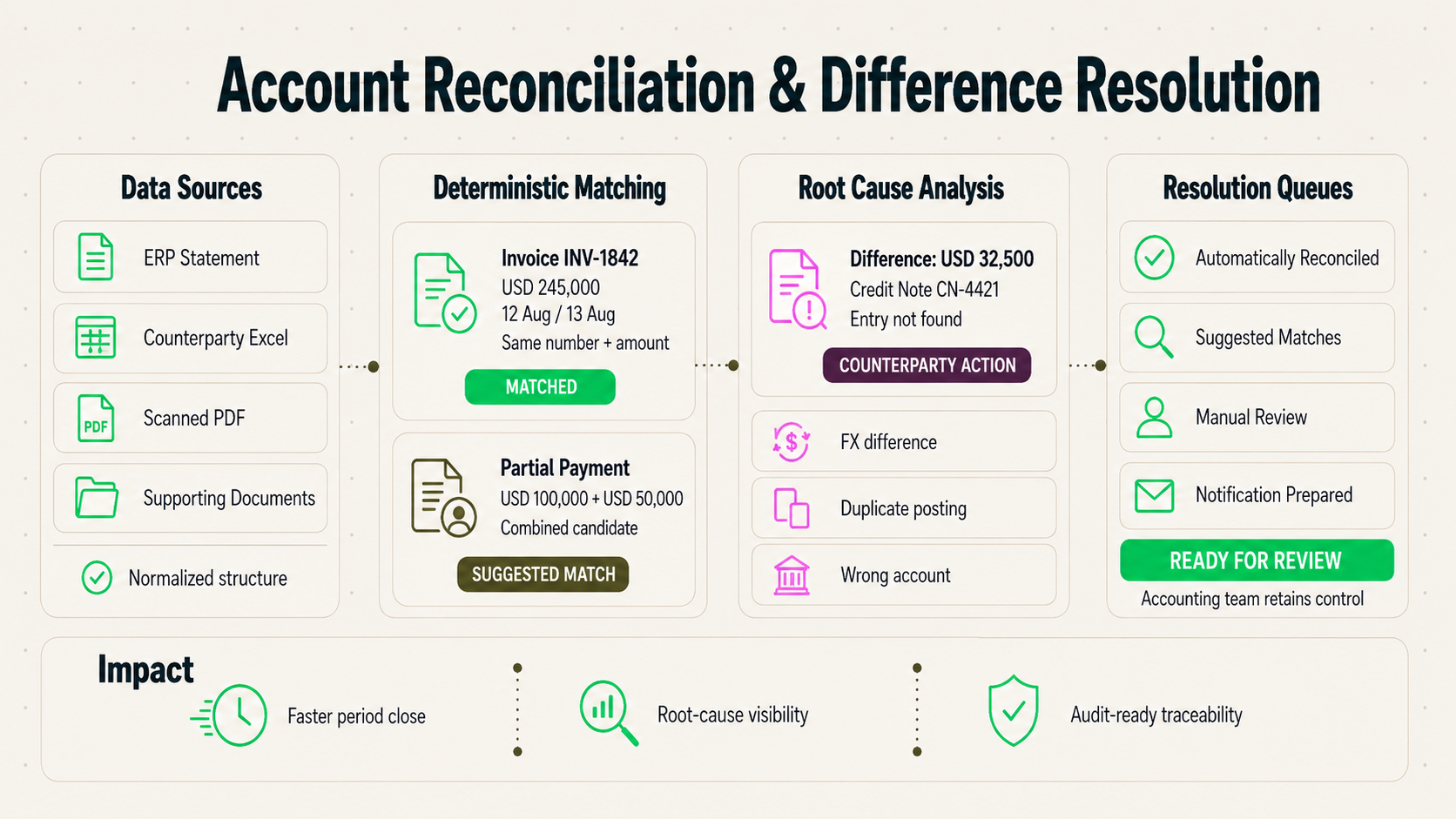
The Agent normalizes data from different formats, matches transaction lines using deterministic reconciliation rules, classifies unresolved items by root cause, and separates automatically resolved, suggested-match, and manual-review cases into different workflows.
Capabilities
OCR & Excel Normalization:
Reads ERP exports, irregular Excel files, and scanned PDF statements, and converts them into a common structured format for reconciliation.
ERP Integration:
Retrieves account and transaction data from the organization’s ERP environment and combines it with counterparty statements within the same reconciliation process.
Line Matching:
Matches transactions using document number, amount, date tolerance, and partial-payment combinations before escalating ambiguous items for review.
Difference Classification:
Classifies unresolved discrepancies by likely root cause, such as timing differences, missing returns or discount notes, FX differences, duplicate entries, or postings to the wrong account.
Case Study
Traditional Workflow
When a counterparty responds that balances do not reconcile, accounting teams typically open both account statements side by side and compare transaction lines manually.
Recurring causes include timing differences, missing return or discount documents, foreign exchange differences, duplicate postings, partial payments, and transactions posted to the wrong account.
Workflow with Upsonic
With Upsonic, the organization’s ERP statement, the counterparty’s Excel file, and scanned PDF statements are processed together.
The Agent matches by document or invoice number, amount, date tolerance, reference number, partial payment combinations, and multiple entries that collectively correspond to one transaction.
ERP Record
Invoice No: INV-1842
Amount: TRY 245,000
Date: 12 August
Counterparty Record
Invoice No: INV-1842
Amount: TRY 245,000
Date: 13 August
Result: MATCHED
Reason: Same invoice number and amount, within accepted date tolerance
ERP Entry: TRY 150,000 receivable
Counterparty Entries: TRY 100,000 + TRY 50,000 payments
Potential Match: Combined partial payment
Confidence: High
Result: SUGGESTED MATCH
Difference: TRY 32,500
ERP: Credit note recorded
Counterparty Statement: No corresponding credit note
Root Cause: Missing discount / credit note on counterparty side
Status: Counterparty Action Required
The Agent separates items into Automatically Reconciled, Suggested Matches, and Manual Review queues and prepares discrepancy notifications for unresolved cases.
Impact
Upsonic reduces the manual effort required after a counterparty responds that accounts do not reconcile.
Teams can focus on genuinely ambiguous cases while automatically matched items, suggested resolutions, and counterparty action items are managed in separate queues.